
VM Labs · Microsoft Dynamics 365
Experience Microsoft Dynamics 365 Finance & Operations hands-on. Work with Contoso demonstration data, follow detailed Microsoft Learning labs, and practice at your own pace in a dedicated virtual training environment.
180 days access · 7-day save period · Reset and restart anytime
Get hands-on experience with Microsoft Dynamics 365 Finance & Operations in a dedicated, cloud-hosted training environment. Work with Contoso demonstration data, follow detailed Microsoft Learning labs, and practice at your own pace.
✓ Ready-to-use D365FO environment with Contoso demo data
✓ Detailed Microsoft Learning hands-on labs
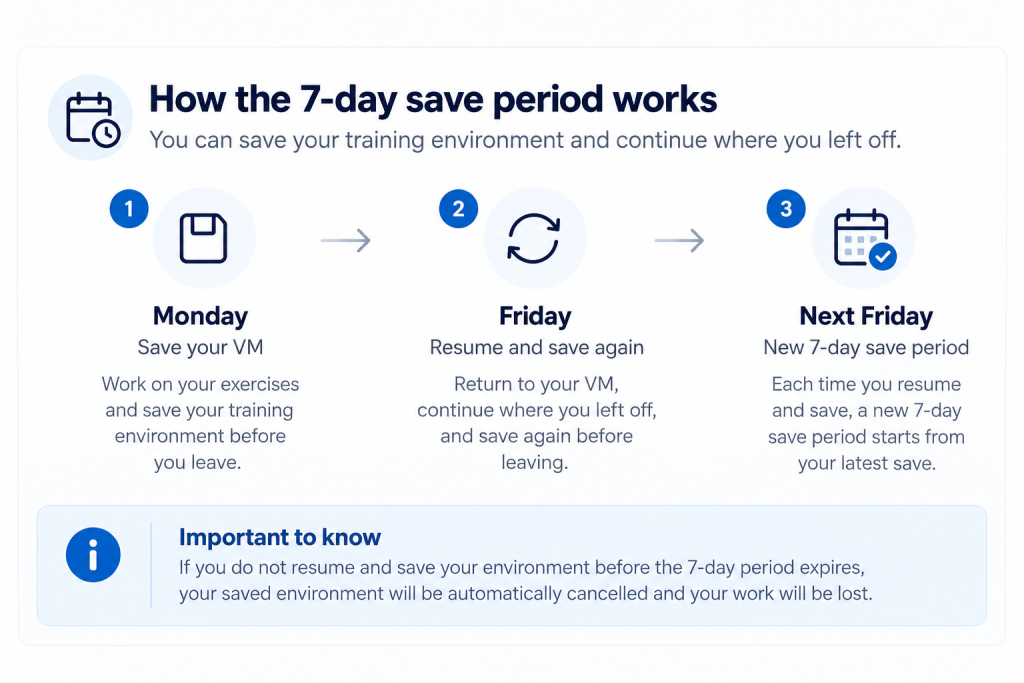
✓ Save & Resume – preserve your work for 7 days
✓ Reset & Restart – start fresh whenever you want
227 $
Develop and test Microsoft Dynamics 365 Finance & Operations applications in a dedicated virtual training environment.
Build practical development skills with a ready-to-use Dynamics 365 Finance & Operations environment, Visual Studio, Contoso demonstration data, and detailed Microsoft Learning lab exercises.
Work directly with development tools, explore application extensions and data integration, and repeat hands-on exercises at your own pace.
The training environment supports five structured Microsoft Learning labs covering essential Finance & Operations development tasks:
Each lab provides practical exercises designed to help you develop and apply technical skills in Microsoft Dynamics 365 Finance & Operations.
Your dedicated, cloud-hosted environment includes:
Practice development tasks, experiment with different approaches, and repeat exercises to reinforce your skills.
The Save Period determines how long your saved lab environment is retained after your most recent save. It is separate from the overall access period.
Once your payment has been confirmed, AXcademy will arrange your virtual training environment and email you a Training Key with registration instructions, normally within 24-48 hours.
You must register your Training Key before the deadline specified in the email.
After registration, you can access your virtual training environment and work through the hands-on exercises at your own pace, subject to the applicable lab access period.
For guidance on accessing and using your environment, visit How to Use Our Training Environments (VMs) under My courses in your AXcademy account.
Technical support for the lab environment is provided directly by our service provider.
Develop, test, and extend D365FO applications. Repeat hands-on exercises and build confidence with real development tools.
Get practical Dynamics 365 tips & tricks, course updates, special offers and exclusive subscriber discounts — straight to your inbox.